 SRG+


CRMEarly access on Mac, iPhone and iPad
Every client. Every deal.
Your AI drafts. You send.
SRG+ CRM keeps your contacts, companies and deals in one place, with every email, text and Instagram message in each person's story. Your AI agent writes the replies and the campaigns, and a person sends them. Work in the app on your Mac or iPhone, or ask Claude or ChatGPT.
Early access. On iPhone and iPad through TestFlight.
What is SRG+ CRM?
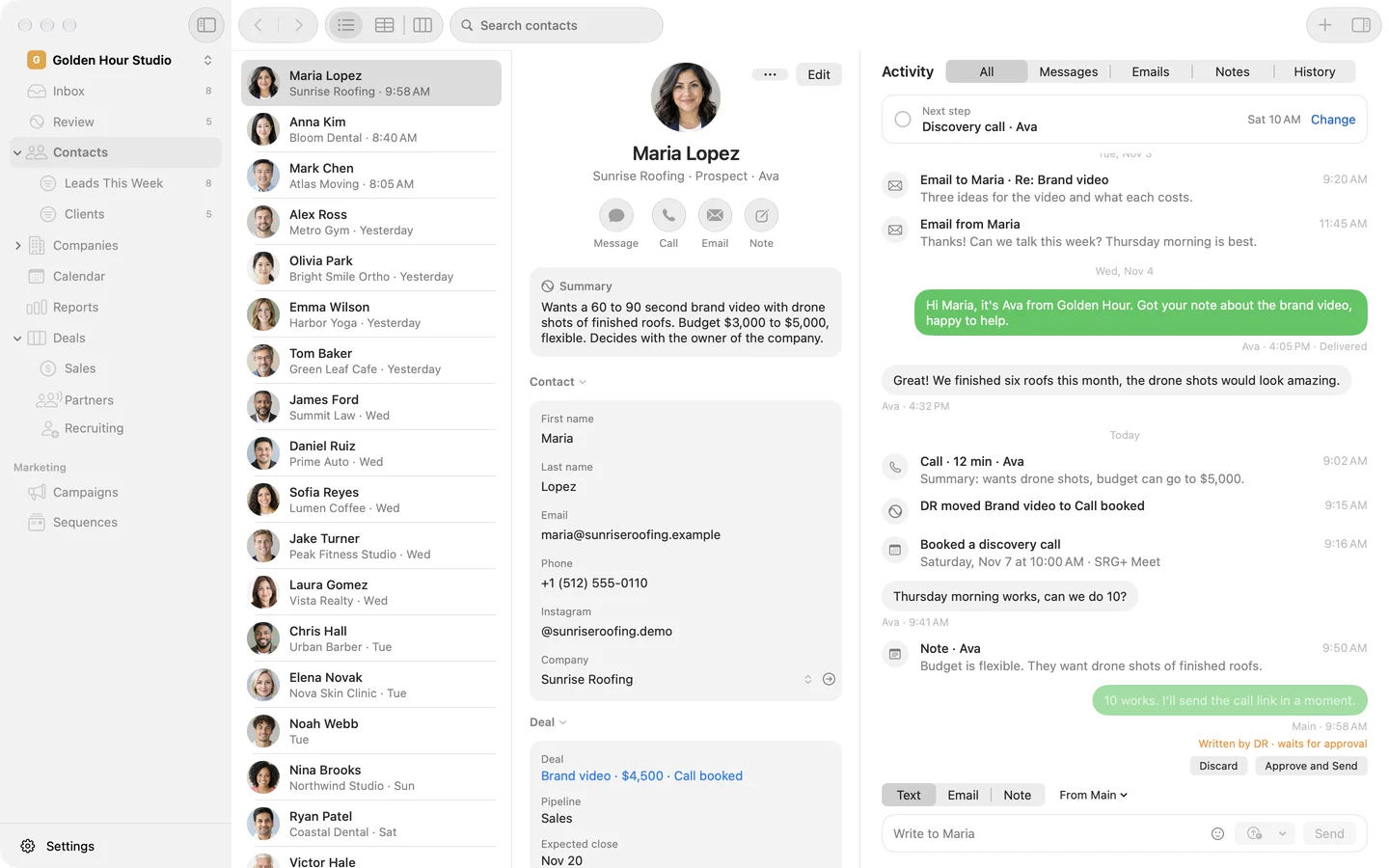
SRG+ CRM is a CRM made for working with AI agents. It keeps your contacts, companies and deal boards with one next step on each, puts every email, text and Instagram message in the person's story, and runs your booking pages, forms and email campaigns. People and AI agents work in the same workspace through SRG+ Connect: agents draft, people send. You use it in the app on Mac, iPhone and iPad or from your AI app, and you sign in with your SRG+ account.
- Status
- Early access on Mac, iPhone and iPad
- AI apps
- Claude, ChatGPT, Codex, Cursor
- Messages
- Email, texts and Instagram
- Price
- Talk to us
Agent-first
Your AI works the pipeline.
You press send.
Connect Claude or ChatGPT once through SRG+ Connect, and your agent can do what you do in the CRM: find who is waiting for an answer, write the reply in their thread, move a deal, set its next step and build a campaign. It works as itself, with the tools you turn on for it, and every step it takes shows in the person's story with its name.
- More than 130 tools
- Drafts wait for you
- One next step per deal
- One history
Who wrote to us this week and is still waiting for an answer? Draft a reply to each.
Your agent, through SRG+ Connect
- Found 3 people waiting: Anna, Mark and Tom
- Drafted 3 replies, each in its own thread
- Set a next step on each deal
Your 3 drafts are in SRG+ CRM. Nothing goes out until you press Send or Send Later.
Move Tom's deal to Call booked.
- Moved Menu shoot to Call booked
Done. Its next step is the call, Thursday at 2:00 PM.
Works where you chat
Claude, ChatGPT, Codex, Cursor and any app that speaks MCP reach the CRM through one address, SRG+ Connect.
Agents draft. People send.
An agent's email and campaign wait as drafts, and its text waits for a tap. Only a person sends them, now or later.
Every step in the story
What an agent moves, writes or changes shows in the person's story with its name, next to your emails and texts.
You choose what it can do
Turn each tool on or off for each agent in SRG+ Connect, and give it a role in the CRM: admin or member.
Every deal on a board.
One next step on each.
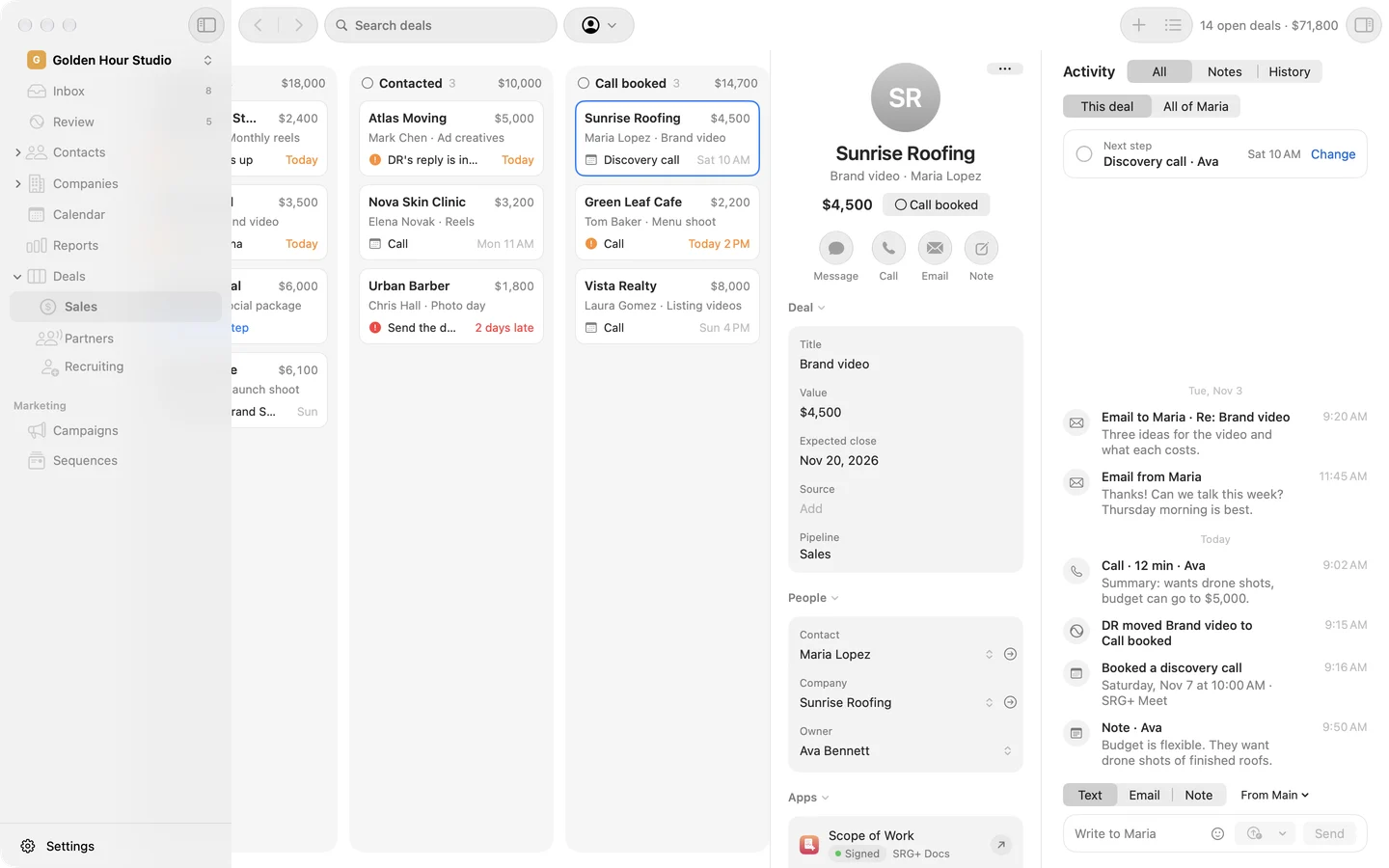
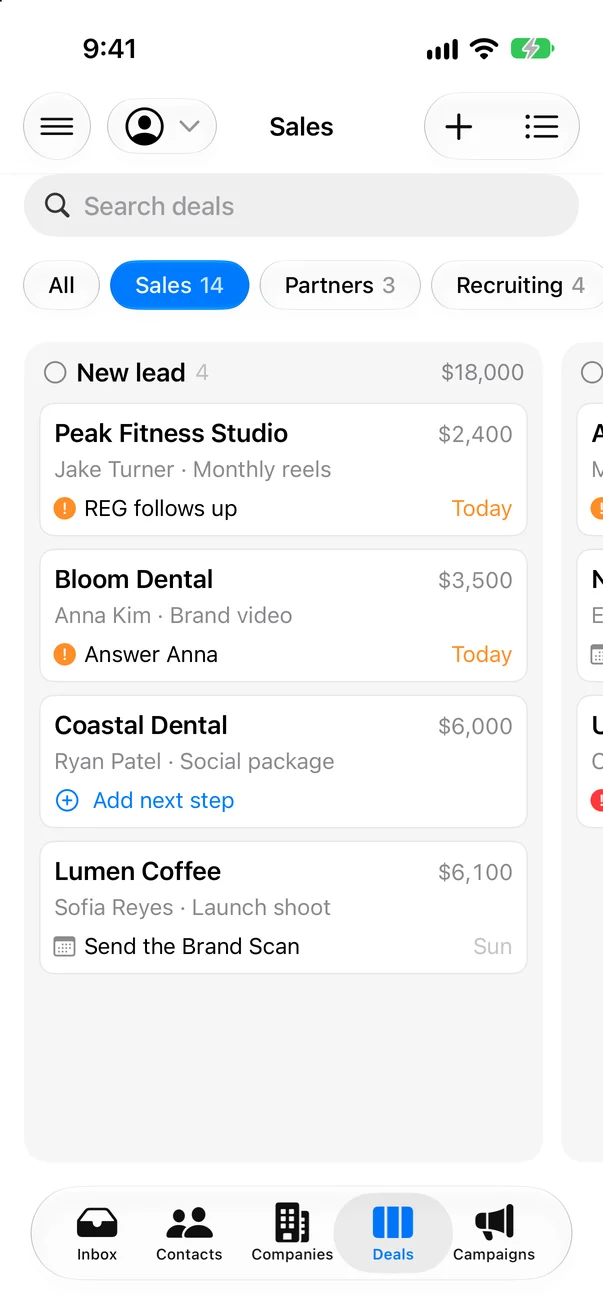
Keep a board for each pipeline: sales, partners, hiring. Drag a deal to its stage and see what each stage is worth. Every deal and every person carries one next step, with its day and who does it, so nothing waits in a forgotten task list.
iPhone and iPad
Every client
in your pocket.
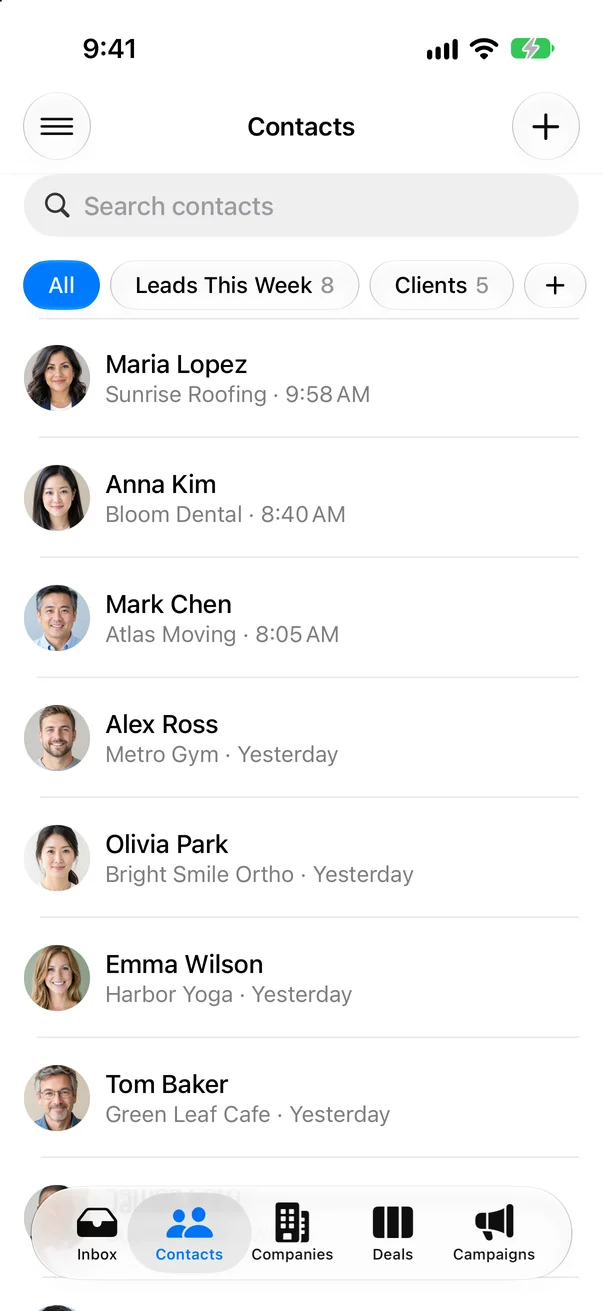
SRG+ CRM runs on iPhone and iPad too: your contacts and Smart Lists, your deal boards, the Inbox and each person's story, with a push the moment someone writes. Reply by email, text or Instagram from wherever you are.
- Contacts and Smart Lists
- Deal boards
- Push for new messages
- Reply from anywhere
Early access on iPhone and iPad through TestFlight.
-
One Inbox.
Email, texts and Instagram.Every new message lands in one list, with a push on your iPhone the moment it comes in. Open it and the person's whole story is there, with the reply box under it.
Inbox4 new
 Anna Kim EmailDo you have a few dates for a call?8:40 AM
 Mark Chen TextHow much for three ad variations?8:05 AM
 Sofia Reyes InstagramLoved the reel! Can we do one for our launch?Yesterday
 Laura Gomez EmailSix listings this month. Can you film them all?Yesterday
-
Write it now.
Send it at 9 AM.Send Later sits right beside Send, as in Mail. Pick tomorrow morning or any time, and the email goes out in its thread. An agent's draft opens the same way, ready for your changes.
ToMaria Lopez
SubjectRe: Brand video
Hi Maria, here is the offer for the brand video, with the drone shots of your finished roofs.
SendSend Later
Smart Lists.
Saved the way you work.
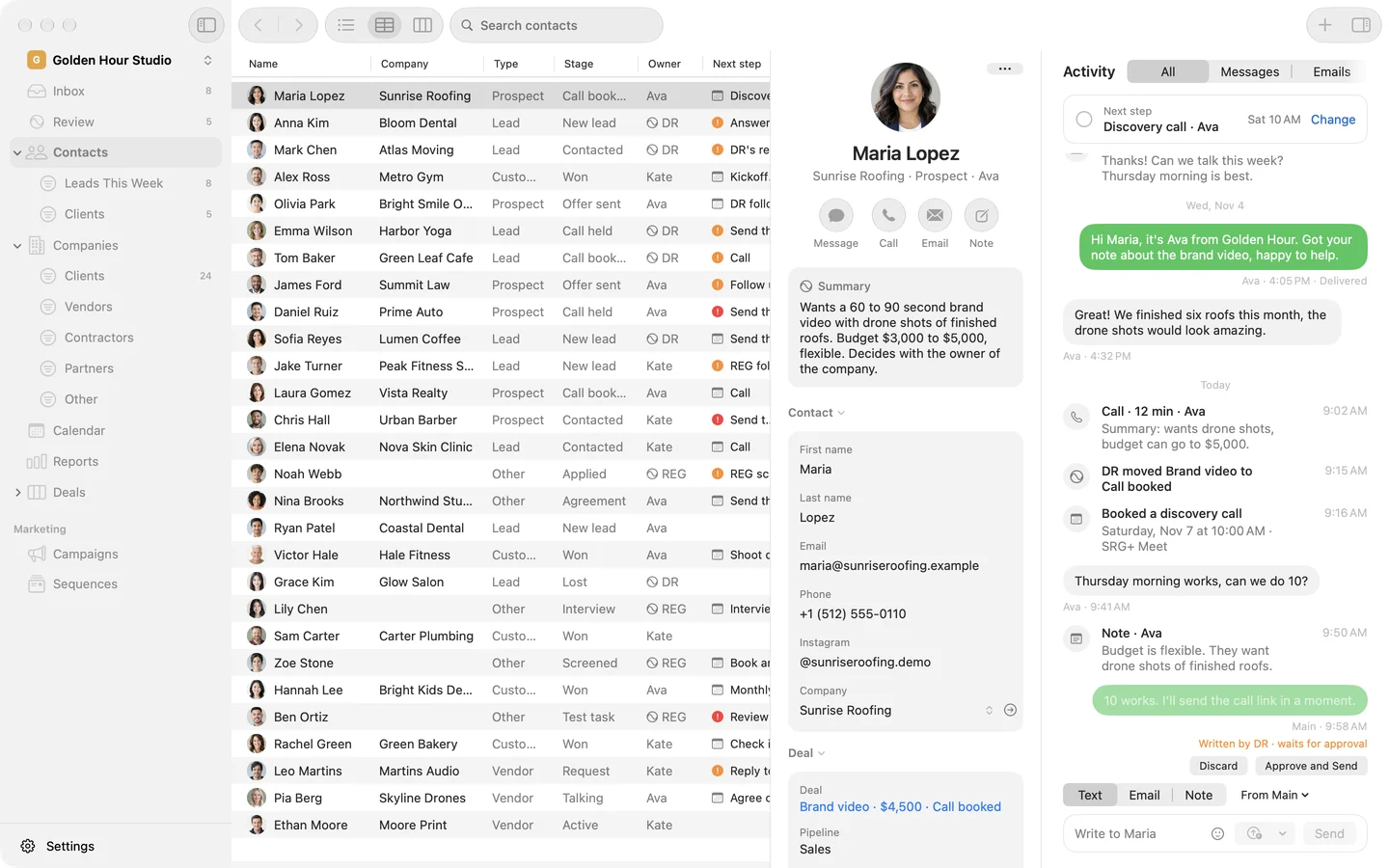
See your contacts as a list, a table or a board. Save any filter as a Smart List, like Leads This Week, and it sits in the sidebar with its count. Companies keep their type, client, vendor, contractor or partner, and each person's details open beside the table.
Booked calls and forms.
Straight into deals.
Share a booking page, or put one or a form on your site. Each booking or form makes the contact and the deal in the stage you pick, and your team hears of it at once by email and text.
- Booking pages
- Forms on your site
- A deal from each
- Your team told at once
Discovery call30 min
Tue10Wed11Thu12Fri13
9:00 AM10:00 AM11:30 AM2:00 PM
 Maria LopezNew contact · Sunrise RoofingContact
Brand videoSales · Call bookedDeal
Your team gets an email and a text.
Campaigns that land
in the inbox.
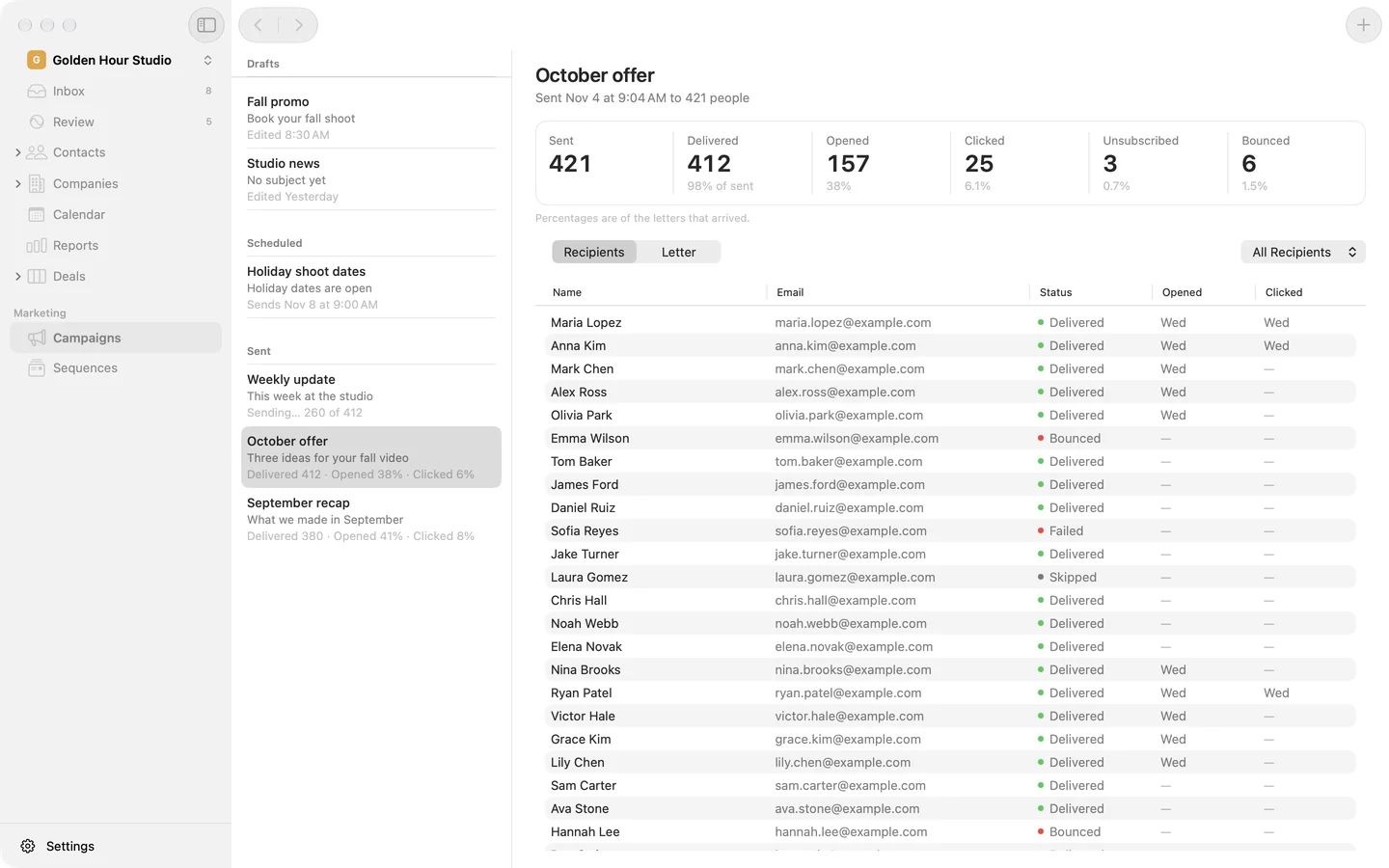
Write a campaign once, pick who gets it by type or tag, and see who is left out and why: no email, unsubscribed or asked not to be contacted. Send it from your own address at a steady pace, then see who got it, opened it and clicked.
Everything in SRG+ CRM.
Contacts and companies
A list, a table or a board, Smart Lists in the sidebar, companies by type.
Deal boards
A board per pipeline, with each stage's value. Drag a deal to move it.
One next step
On every deal and person, with its day and who does it.
Gmail in every contact
Each person's threads in their story. Reply, save a draft or Send Later.
Texts
From your business number, with pictures, in the same story.
Instagram messages
Read and answer your Instagram DMs next to the rest.
Inbox and push
Every new message in one list, with a push on your iPhone.
Campaigns
Designed emails at a steady pace, with opens and clicks.
Booking pages and forms
Each booking or form makes the contact and the deal.
Payments on a deal
Its invoices from Stripe and QuickBooks: paid, late or to come.
Contractor details
One secure link asks a contractor for bank details and a tax form.
Client workspaces
For agencies: a workspace per client, reached from one menu.
This site books its calls with SRG+ CRM.
The Book a call page on srgplus.app is an SRG+ CRM booking page. Each call booked there lands in our own CRM as a contact and a deal, and our team hears of it at once.
Questions
What is SRG+ CRM?
SRG+ CRM is a CRM made for working with AI agents. It keeps your contacts, companies and deal boards with one next step on each, puts every email, text and Instagram message in the person's story, and runs your booking pages, forms and email campaigns. People and AI agents work in the same workspace through SRG+ Connect.
Can an AI agent send emails to my clients?
Not on its own. An AI agent in your workspace writes its email or campaign as a draft, and its text waits for a tap. A person opens the draft in SRG+ CRM, changes what they like, and sends it now or with Send Later. An AI app you sign in to as yourself acts as you, and shows you the text before it sends. Every step an agent takes shows in the person's story with its name.
Which AI apps work with SRG+ CRM?
Claude, ChatGPT, Codex, Cursor and any app that speaks MCP, through one address: https://connect.srgplus.com/mcp. The steps for each app are on srgplus.app/mcp.
Which messages does SRG+ CRM bring in?
Email from your Gmail, texts from your business number and Instagram messages. Each one lands in the person's story and in the Inbox, with a push on your iPhone, and you reply from the same place.
Can I bring my contacts from another CRM?
Yes. Ask your AI app to import a spreadsheet of contacts: it checks the file first, shows you what it will add and what it will match, and imports after you say yes. Or talk to us at srgplus.app/contact and we plan the move with you.
Does SRG+ CRM work for agencies?
Yes. An agency keeps a workspace for each client, with the client's own contacts and deals, and its owners and admins reach every client from one menu.
Is SRG+ CRM available now?
Yes, in early access. Download it for Mac at srgplus.app/crm/download/mac, or get it on iPhone and iPad from TestFlight at srgplus.app/crm/testflight, and sign in with your SRG+ account. We set up your workspace with you, so talk to us first.
Run every client
on SRG+ CRM.
Early access on Mac, iPhone and iPad. Get the app, sign in with your SRG+ account, and connect your AI. Talk to us and we set up your workspace with you.