 SRG+


DocsEarly access on Mac and the web
Send it. Sign it.
Prove it.
SRG+ Docs keeps your contracts, releases and company papers in one library and gets them signed. People sign in the browser with a code from their email, no account needed, and every signed copy carries its own fingerprint and an independent timestamp. Your AI agent prepares the papers; a person says send.
Early access. Sign in with your SRG+ account; the people who sign need none.
What is SRG+ Docs?
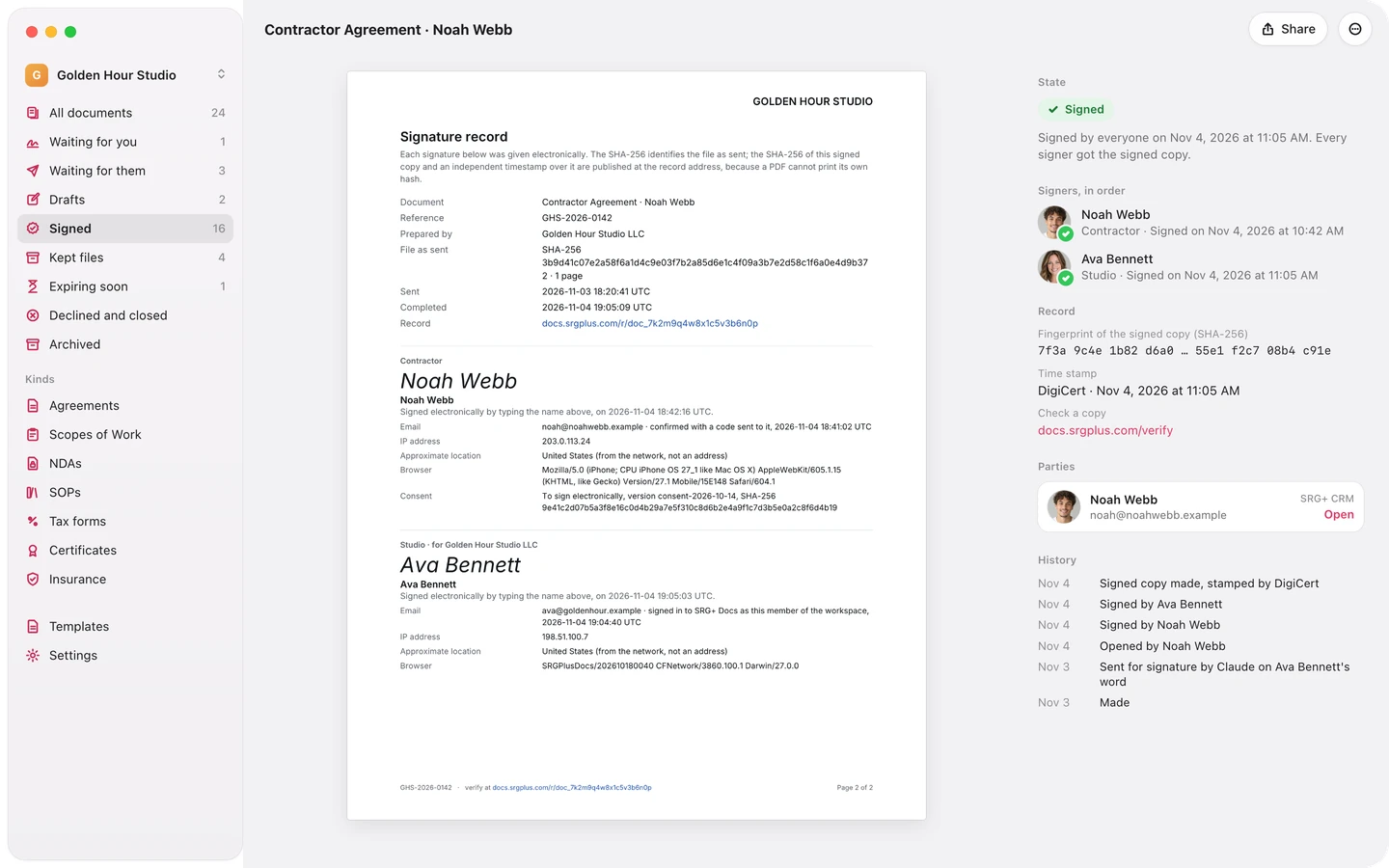
SRG+ Docs is a document library with e-signatures, made for working with AI agents. Keep agreements, Scopes of Work, NDAs, certificates and tax forms in one place, write a document or upload a PDF, make one for each person from a template, and send it for signature in the order you choose. Signers open the link in their email and sign with a code. Every signed copy gets its SHA-256 fingerprint and an independent timestamp, and anyone can check a copy. People and AI agents work in it through SRG+ Connect: agents prepare, people say send.
- Status
- Early access on Mac and the web
- Signing
- In the browser, with an email code
- Proof
- SHA-256 and a DigiCert timestamp
- Price
- Talk to us
Agent-first
Your AI prepares it.
You say send.
Connect Claude or ChatGPT once through SRG+ Connect, and your agent can do what you do in SRG+ Docs: make the agreements from a template and fill in each person's details, find who still has to sign, remind them and file what comes back. It sends a document only on a person's word, and their words go on the document's history.
- 26 Docs tools
- Sends only on your word
- Never signs for you
- Every step in the history
Make contractor agreements for Noah, Lily and Ben for the Green Bakery shoot, $900 a day.
Your agent, through SRG+ Connect
- Made 3 drafts from Contractor Agreement, version 3
- Filled in names, emails, dates and the rate
- No field left empty


 Noah Webb, Lily Chen, Ben Ortiz
They are in Drafts. Say the word and I send them.
Send them.
- Sent 3 agreements on your word
Each person signs from their email with a code. Your words are on each one's history.
Lily hasn't signed yet. Remind her.
- Reminded Lily Chen with a fresh link
I can remind her again tomorrow.
Works where you chat
Claude, ChatGPT, Codex, Cursor and any app that speaks MCP reach SRG+ Docs through one address, SRG+ Connect.
Sends only on a person's word
To send or cancel, an agent names who asked and quotes their words. Both go on the history, and that person is the sender.
Never signs for you
Signing is for people. An agent cannot sign, make a share link or publish a template, and never sees tax or private forms.
You choose what it can do
Turn each tool on or off for each agent in SRG+ Connect. An agent reminds the same person at most once a day.
One template.
Every contract.
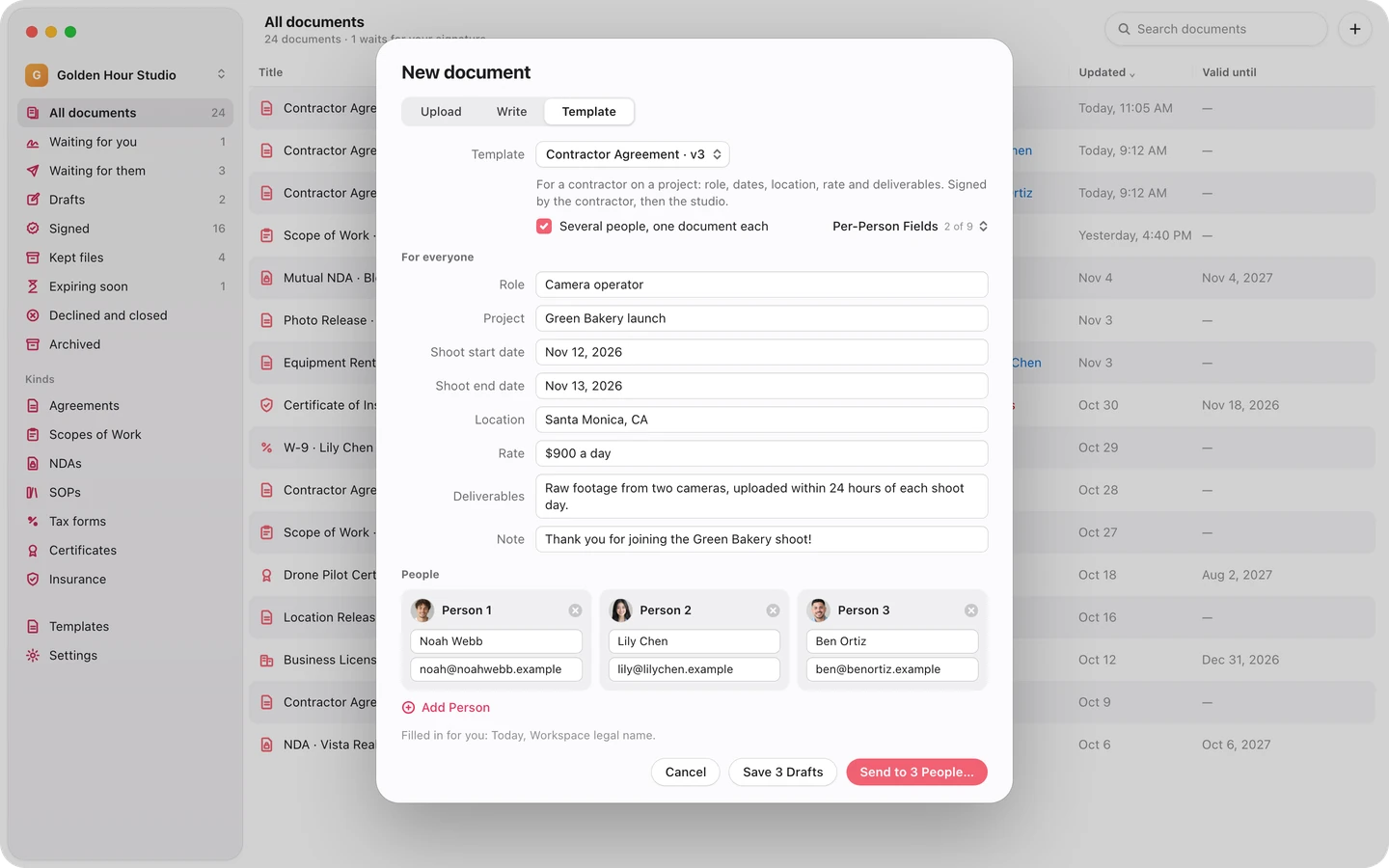
Write a template once, with fields like {{contractor.name}} and {{rate}} and a place for each signature, and publish it as a version that never changes. Then make one document for each person, up to 25 at once: what is the same for everyone is typed once, and they all go out in one step.
For the people who sign
No app. No account.
Just a code.
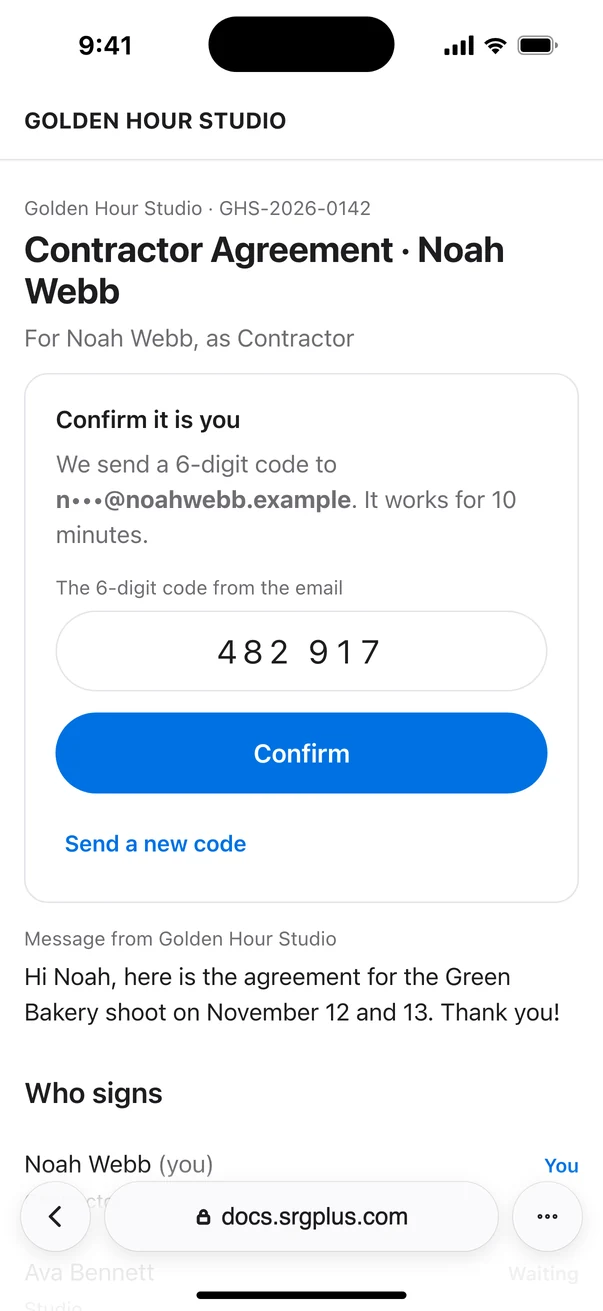
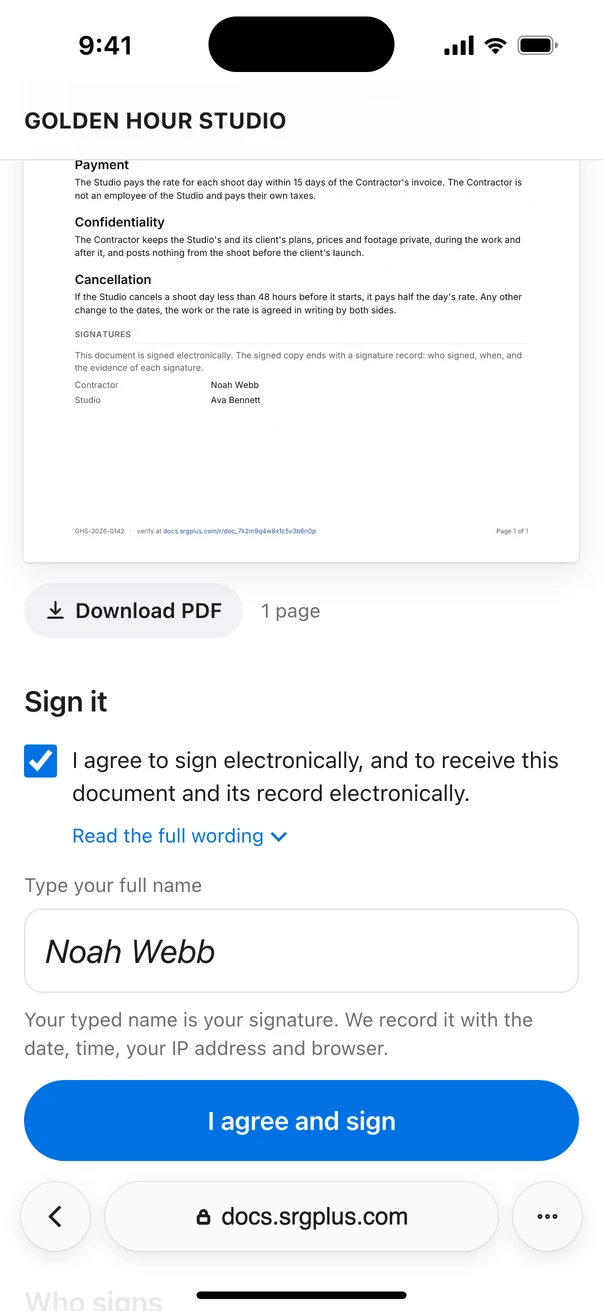
Your signer gets an email in your company's name with one button, Review and sign. They enter the 6-digit code we send them, read the document on their phone or computer, type their name and tap I agree and sign. If something is off, they decline and say why, and you hear of it by email.
- A code by email
- Their typed name
- Any phone or computer
- Signers in your order
Up to 10 signers, one after another: each gets the link when the one before has signed.
Sealed records
Every signature,
sealed and checkable.
When the last person signs, SRG+ Docs makes the signed copy: your pages exactly as they were sent, then a signature record with each signer's typed name, the email they confirmed with a code, and the time. The copy gets its SHA-256 fingerprint and a timestamp from DigiCert, an independent authority, and everyone who signed gets it by email.
Anyone can check a copy at docs.srgplus.com/verify. Their browser takes the fingerprint, the file never leaves their computer, and change a single byte and it no longer matches.
Check a copy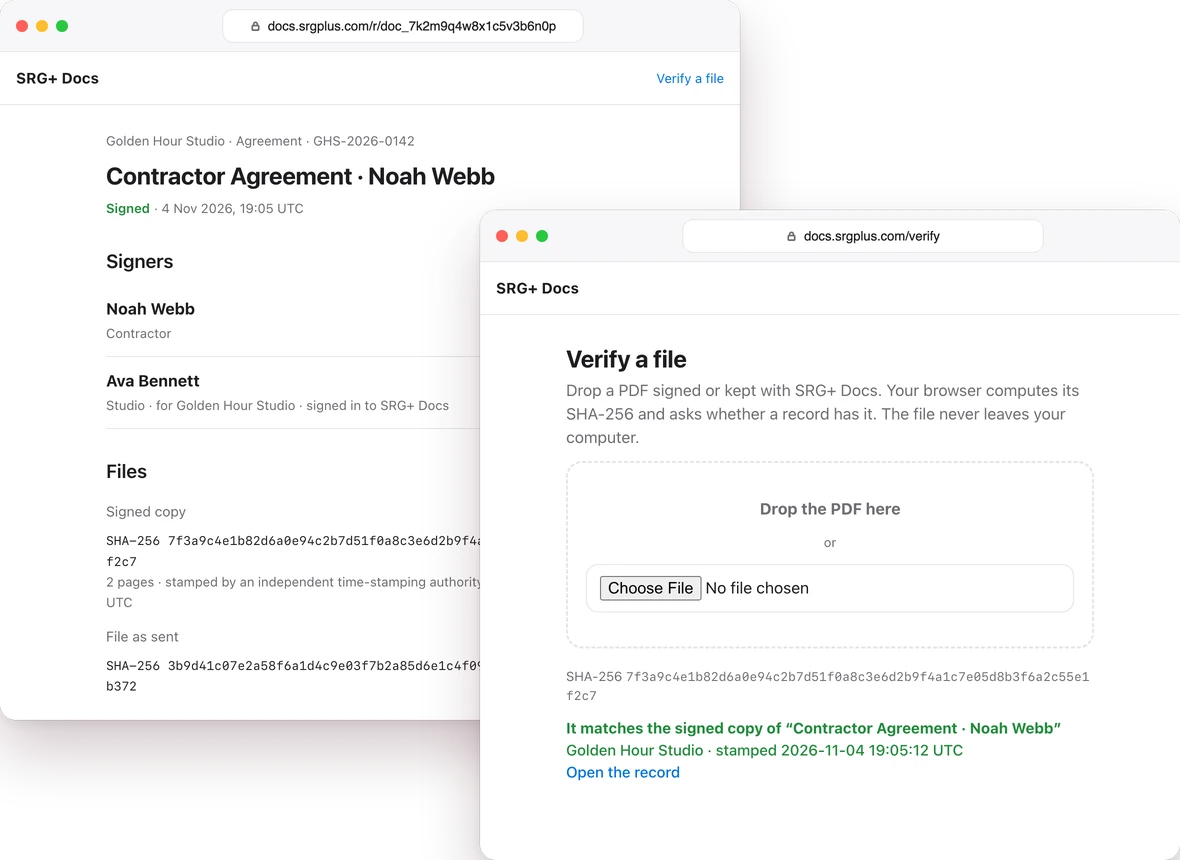
-
Remind in one tap.
Whoever is next gets a fresh link from the document's menu. Your agent can do it too, at most once a day for each person. Every reminder shows in the history.
Contractor Agreement · Lily ChenWaiting for Lily Chen -
Tied to your clients
in SRG+ CRM.A person or company on a document can be your contact in SRG+ CRM. Open the document and their email, phone and deals are right there, and you can link the deal it belongs to.
PartiesScope of Work · Spring campaign
 Maria LopezSunrise RoofingOpen
Emailmaria@sunrise.example
Phone+1 (555) 010-0142
SRG+ CRM
Deals
Spring campaign$4,800 · WonOpen
Every paper.
One library.
Agreements, Scopes of Work, NDAs, certificates, insurance and tax forms, each in its kind. See what waits for you, what waits for them and what runs out within 30 days. Search by title, reference or name, and keep PDFs, scans and photos that need no signature, with every new version beside the old one.
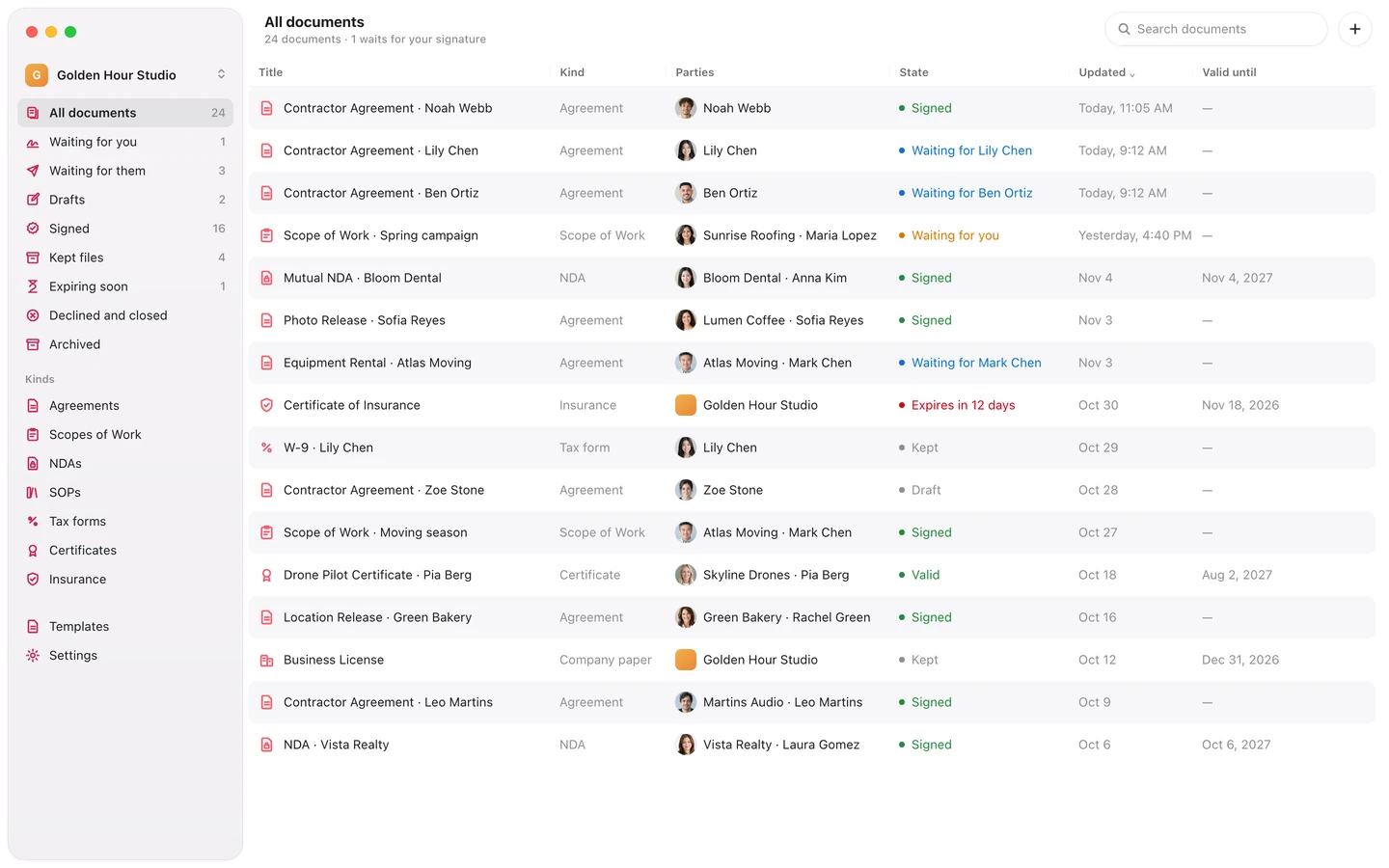
Everything in SRG+ Docs.
One library
Every document in its kind, with who it is for and what waits for whom.
Write or upload
Write a document in the app, upload a PDF to sign, or keep a scan or a photo.
Templates
Fields, a place for each signature, and published versions that never change.
Many at once
One document for each of up to 25 people, sent in one step.
Signers in order
Up to 10, each emailed when the one before has signed.
Email code signing
A 6-digit code and their typed name. No account, no app.
Sign as your company
The member who signs for the workspace adds the company's signature in the app.
Sealed signed copy
A signature record, the SHA-256 fingerprint and a DigiCert timestamp.
Public check
Anyone drops a copy on docs.srgplus.com/verify. The file stays on their computer.
Reminders
A fresh link for whoever is next, by you or by your agent.
Share links
One link for a document, with how often it was opened, and you can stop it.
Members and roles
Owner, Admin and Member, and who may sign for the workspace.
We sign our own papers with SRG+ Docs.
Our studio sends its crew and contractor agreements with SRG+ Docs, and its AI agents remind whoever has not signed yet.
Questions
What is SRG+ Docs?
SRG+ Docs is a document library with e-signatures, made for working with AI agents. Keep agreements, Scopes of Work, NDAs, certificates and tax forms in one place, write a document or upload a PDF, make one for each person from a template, and send it for signature in the order you choose. Every signed copy gets its SHA-256 fingerprint and an independent timestamp.
Does the person who signs need an account?
No. They open the link in the email from your company, enter the 6-digit code we send to the same address, tick that they agree to sign electronically, type their name and sign. It works on any phone or computer with a browser.
How can anyone check that a signed copy is the real one?
Drop the PDF on docs.srgplus.com/verify. The browser takes its SHA-256 fingerprint without uploading the file and says whether it matches a signed copy, with a link to its public record: who signed, in what role and when, with the fingerprint and the DigiCert timestamp. Change a single byte and it no longer matches.
Can an AI agent send documents for me?
Only on a person's word. An agent can make documents from a template, fill them in, find who still has to sign and remind them. To send or cancel one it names the person who asked and quotes their words; both go on the document's history, and that person becomes the sender. An agent never signs.
Which AI apps work with SRG+ Docs?
Claude, ChatGPT, Codex, Cursor and any app that speaks MCP, through one address: https://connect.srgplus.com/mcp. The steps for each app are on srgplus.app/mcp.
Can I use my own PDF?
Yes. Upload a PDF to send it for signature, or keep a PDF, a scan or a photo of up to 4 MB in the library as it is. You can also write a document in the app or make it from a template.
Is SRG+ Docs available now?
Yes, in early access on the Mac and the web. Download it for Mac at srgplus.app/docs/download/mac, or open docs.srgplus.com, and sign in with your SRG+ account. iPhone and iPad are coming. We set up your workspace with you, so talk to us first.
Send it, sign it,
prove it with SRG+ Docs.
Early access on Mac and the web. Get the app, sign in with your SRG+ account, and connect your AI. Talk to us and we set up your workspace with you.