 SRG+







SitesEarly access on Mac, iPhone and iPad
Your site, live.
Your AI can run it.
SRG+ Sites hosts your website on your own domain. Publish a new version in a moment, roll back in one step, and share a private preview first. Do it in the app on your Mac or iPhone, or ask Claude or ChatGPT to do it for you.
Early access. On iPhone and iPad through TestFlight.
What is SRG+ Sites?
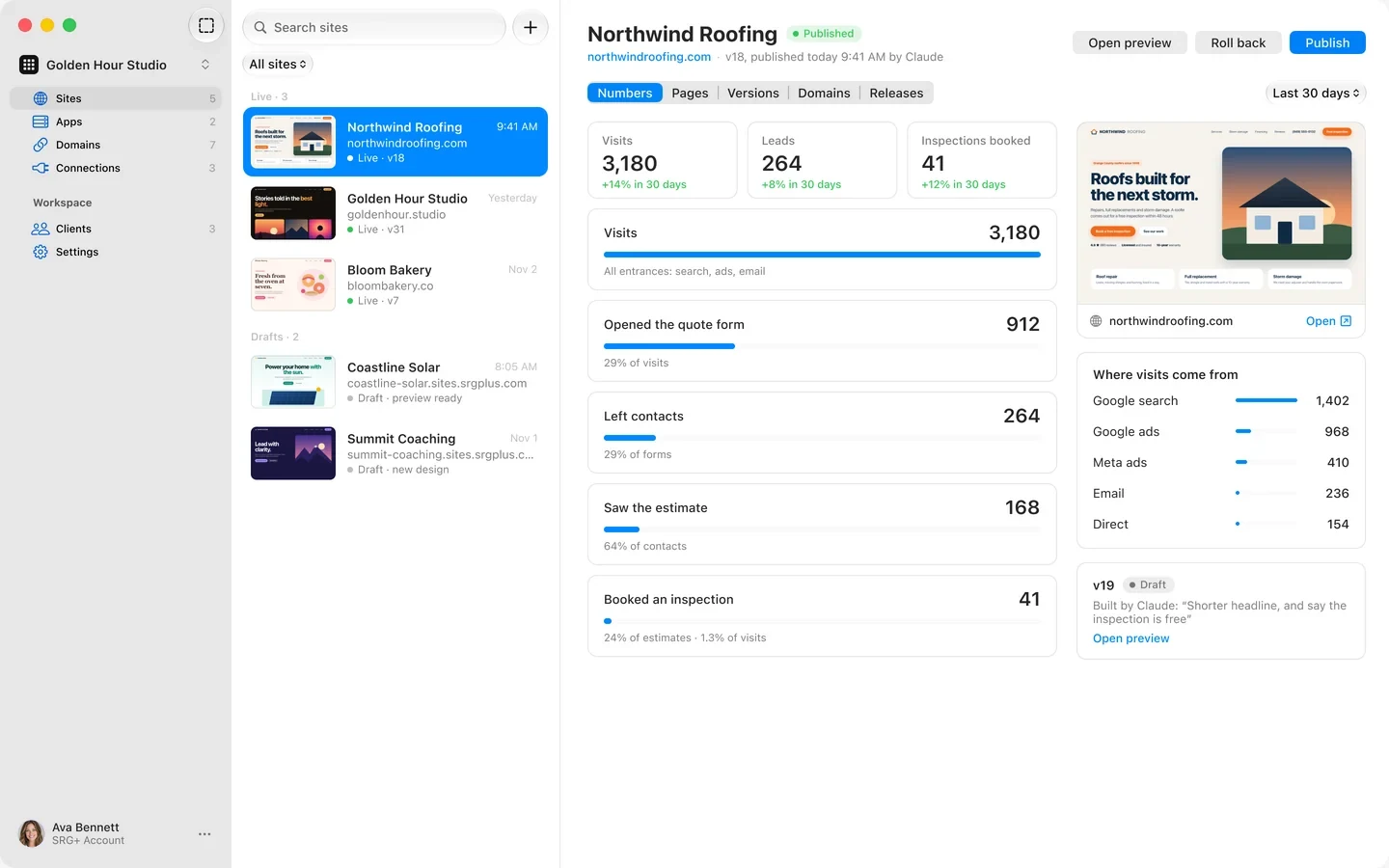
SRG+ Sites is website hosting made for working with AI agents. It puts your site on your own domain with versions, private previews and one-step rollbacks, counts visits and leads on the server, and lets people and AI agents work on the same site through SRG+ Connect. You run it from the app on Mac, iPhone and iPad or from your AI app, and you sign in with your SRG+ account.
- Status
- Early access on Mac, iPhone and iPad
- AI apps
- Claude, ChatGPT, Codex, Cursor
- Address
- Your domain, https included
- Price
- Talk to us
Agent-first
Built for AI agents.
From day one.
Connect Claude or ChatGPT once through SRG+ Connect, and your agent can do what you do in the app: change words on a page, upload a new version, send you a preview, publish it and roll it back. It works as itself, with the role you give it, and every step lands in the same history as yours.
- 37 tools
- Versions, never live edits
- Preview every version
- One history
Change “Free estimate” to “Free roof inspection” on every page of northwindroofing.com, then send me a preview.
Your agent, through SRG+ Connect
- Found 12 places on 6 pages
- Made version 19, nothing else changed
- Made a private preview link for 7 days
Done. Version 19 changes 12 places on 6 pages. Here is your preview:
northwind-roofing.sites.srgplus.com
Looks great. Publish it.
- Published version 19 on northwindroofing.com
Live now. Version 18 is one step away if you want it back.
Works where you chat
Claude, ChatGPT, Codex, Cursor and any app that speaks MCP reach Sites through one address, SRG+ Connect.
Every change is a version
An agent never edits the live site. It makes a new version with its own preview, and any release rolls back in one step.
You choose who publishes
People get a role: owner, admin, editor or viewer. An agent works with the role you give it in SRG+ Connect, and every release shows who published it.
Secrets stay sealed
You can replace a key but never read it back, and agents see the names only, never the values.
iPhone and iPad
Every site
in your pocket.
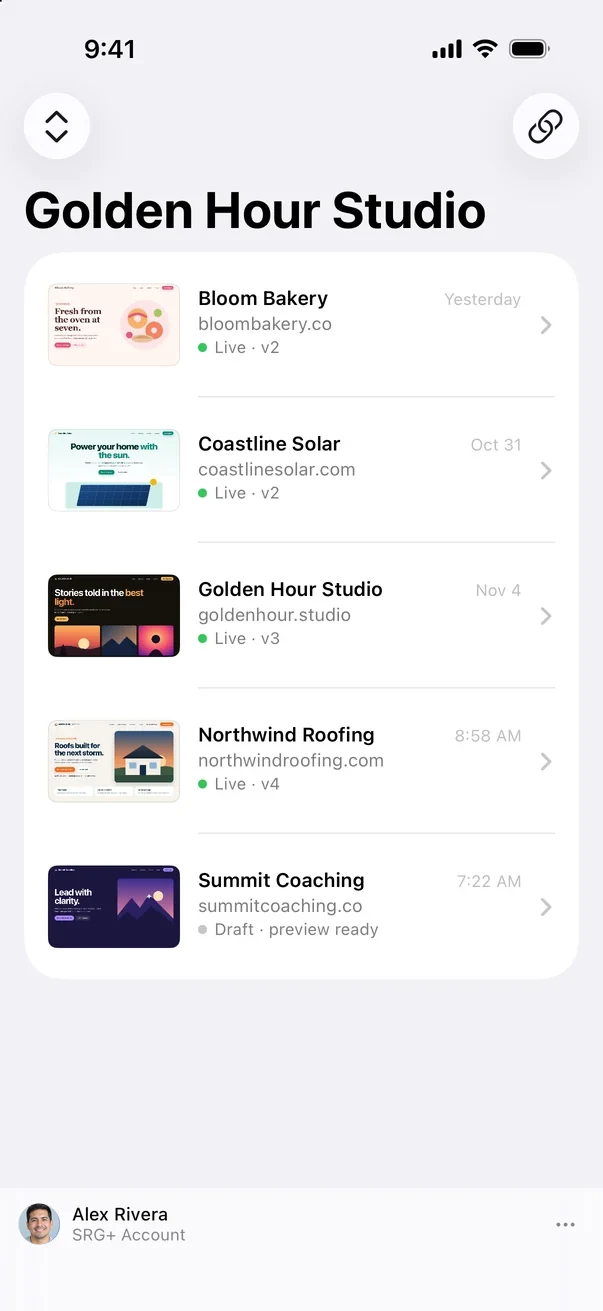
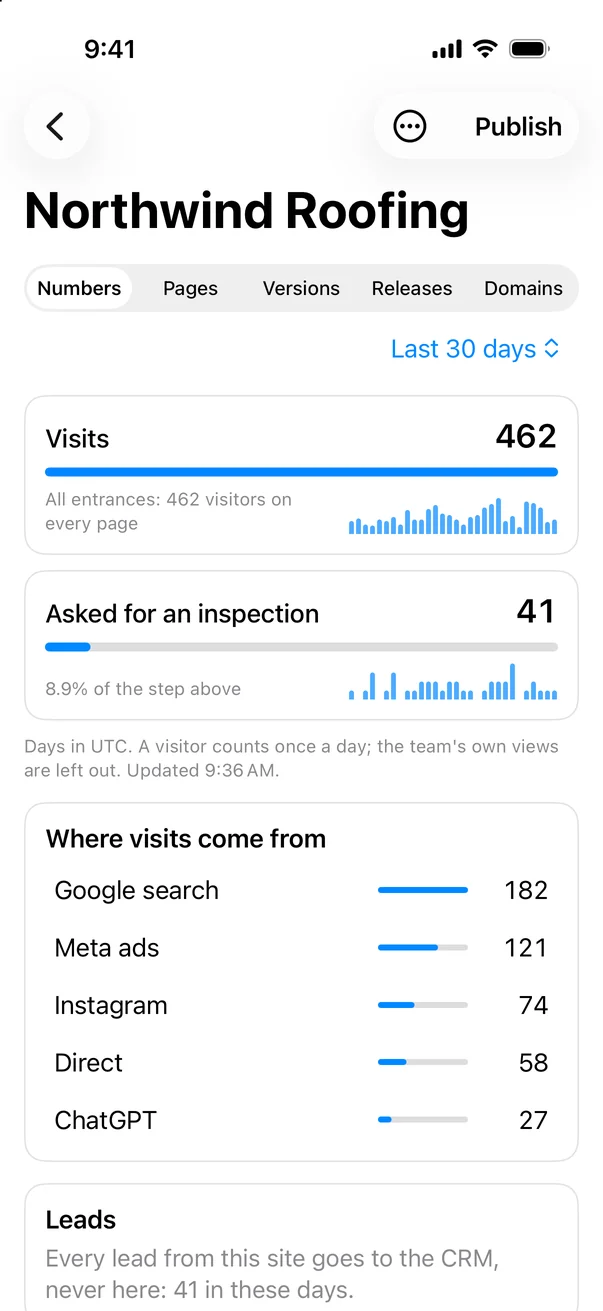
SRG+ Sites runs on iPhone and iPad too. See every site with its picture and whether it is live, its visits and leads and where they came from, and every release. Publish a new version or roll back from wherever you are. On iPad it opens in two columns.
- Every site
- Visits and leads
- Publish and roll back
- iPad in two columns
Early access on iPhone and iPad through TestFlight.
-
Publish in a moment.
Roll back in one step.Every upload is a new version with its own preview. Publish puts it on your domain, any earlier release comes back in one step, and each one shows who published it, a person or an agent.
Releasesnorthwindroofing.com
24Version 19Published by Claude · 9:41 AMLive
23Version 18Published by Ava · YesterdayRoll back
22Version 16Published by Ava · Oct 30Roll back
-
Private until
you share it.A preview is for your team. Send a client a link for 1, 3, 7 or 30 days, or open the preview to everyone. Previews never show up in search.
Every page. Every collection.
One list.
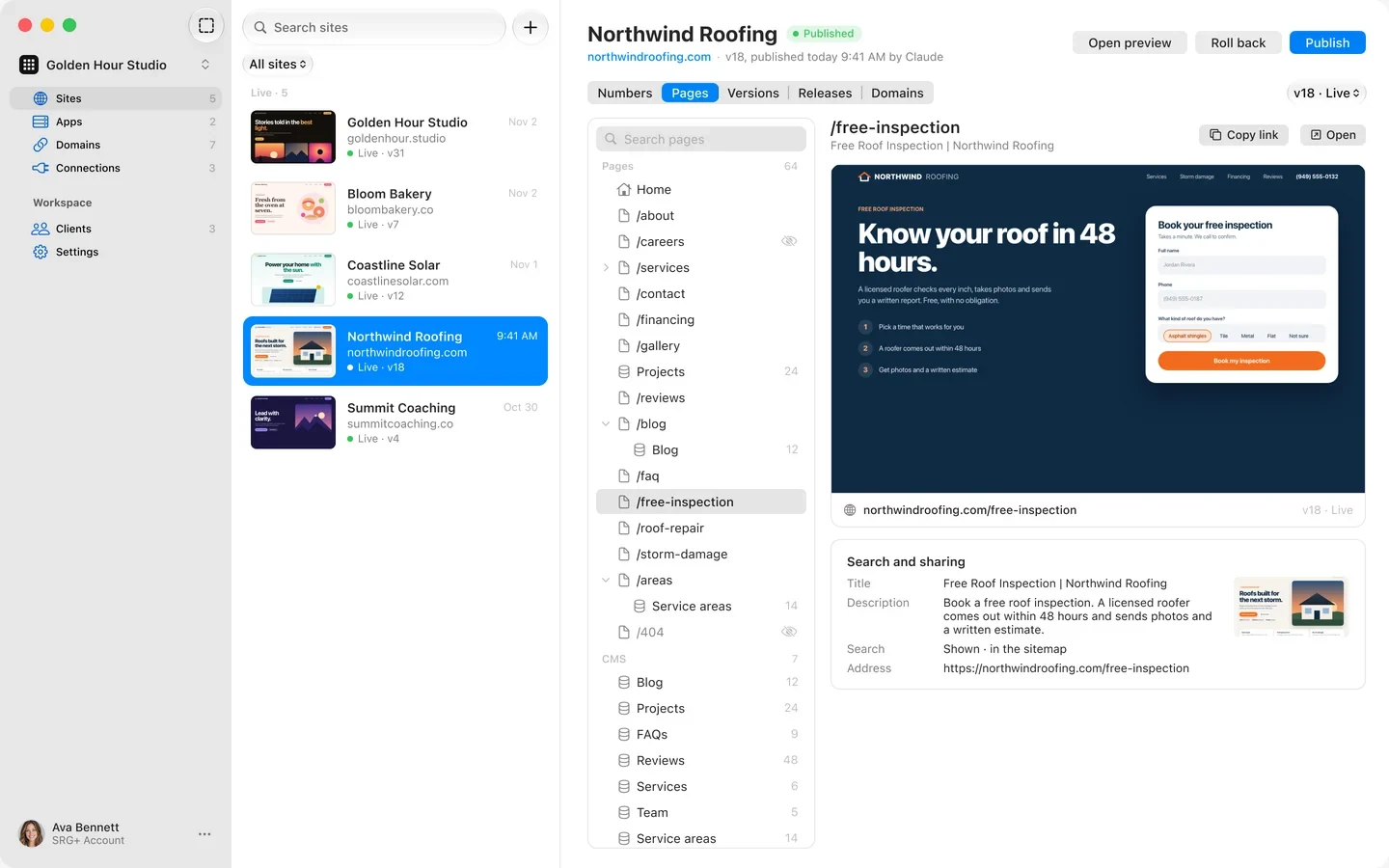
Pages shows your site the way visitors see it: every page with its title, description and address, the hidden ones marked, and your CMS collections with their items. Your AI reads the same list before it changes a word.
Visits and leads.
Counted on the server.
Sites counts visitors, leads and every step of your funnel on the server, and shows where they came from: search, ads, partners, other sites and each campaign. People, search engines, AI crawlers and bots are counted apart, and your team's own views are left out.
- Funnel steps
- Sources and campaigns
- AI crawlers apart
- Your team left out
Requests by kind of visitorLast 30 days
People5,240
Search engines412
AI crawlers96
Bots1,204
Only people count as visits. Your team's own views are left out.
Your domain.
https included.
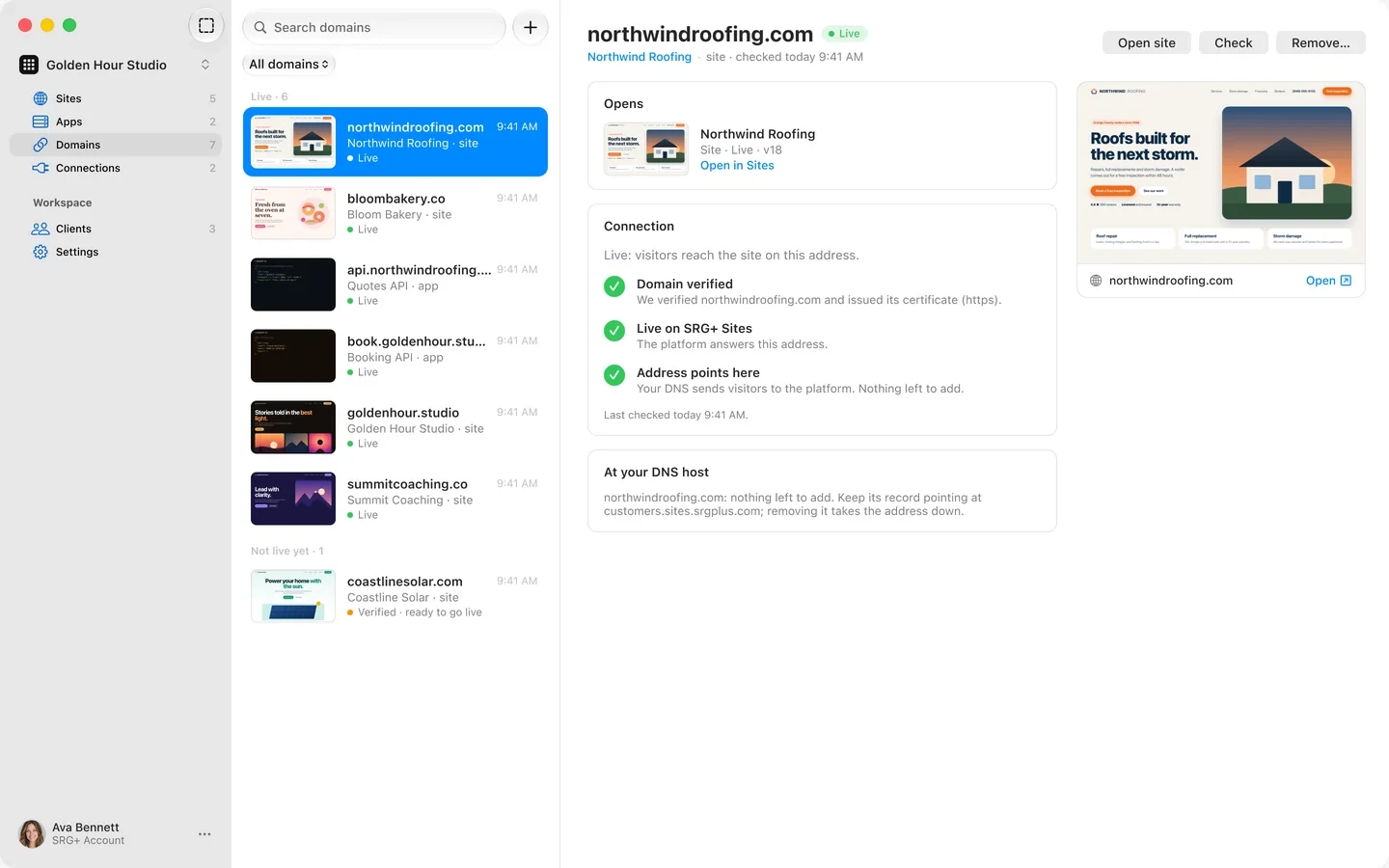
Add your domain, then the DNS records the app shows you. It goes live with its https certificate, and Check tells you exactly what is left. One list shows every address of every site and app, live or waiting.
For studios and agencies
One studio.
Every client's site.
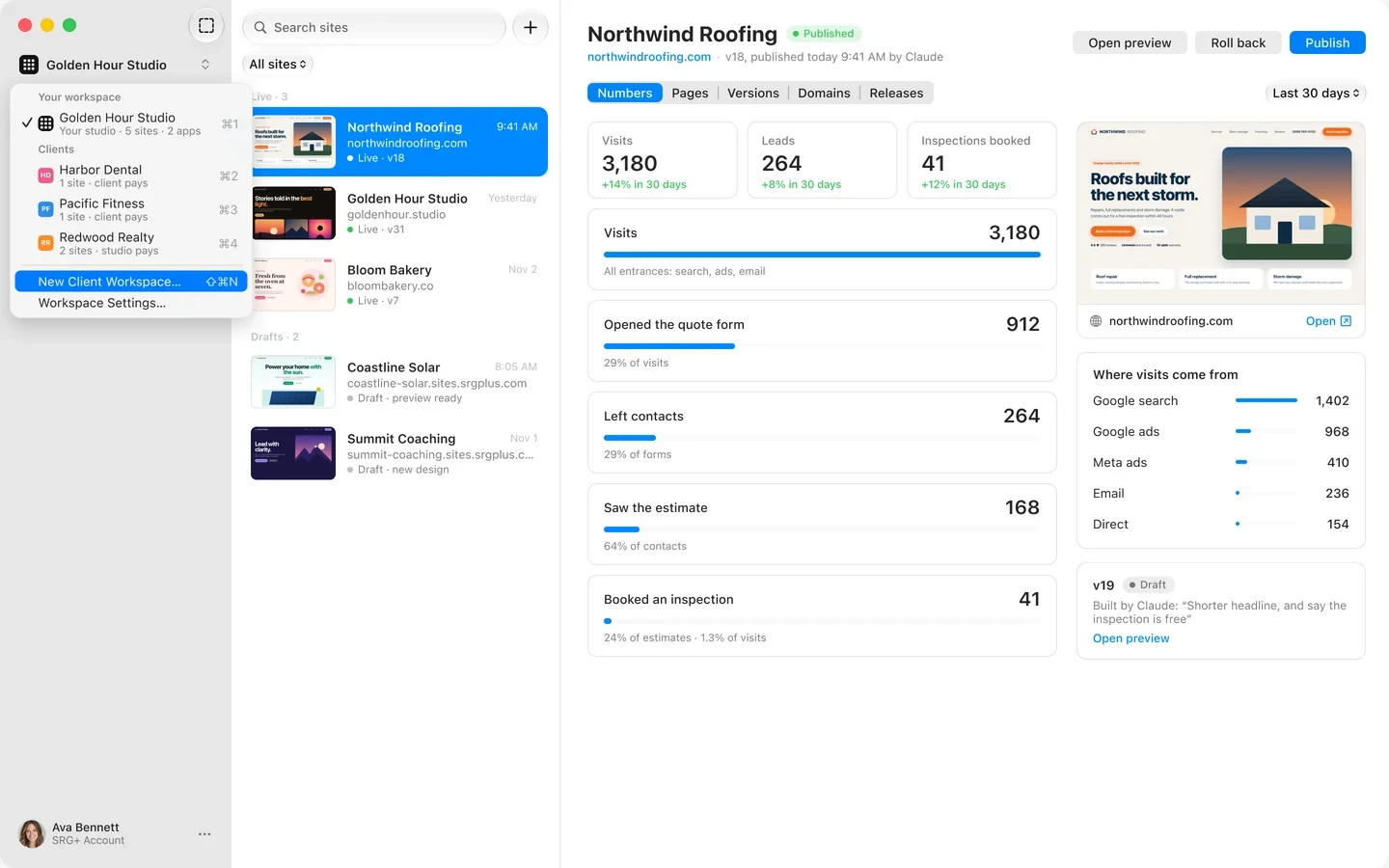
Give each client a workspace with their own people and sites. Your owners and admins reach every client from one menu, a site moves to another workspace when it changes hands, and each client can pay for their own hosting by card.
- Client workspaces
- People and roles
- Move a site
- Clients pay their hosting
AppsLive · 2
Quotes APIapi.northwindroofing.comLive · v9
Booking APIbook.goldenhour.studioLive · v4
- Requests, 24 h
- 18,240
- Errors, 24 h
- None
- Schedule
- Every hour
- Secrets
- 4 sealed
Your API,
next to your site.
Put the server side on SRG+ Sites too: APIs and scheduled jobs, with sealed secrets, logs for every request, and the same versions and one-step rollbacks as your pages.
- APIs
- Scheduled jobs
- Logs
- Sealed secrets
Everything in SRG+ Sites.
Your own domain
Add the DNS records the app shows, and it goes live with https. Check says what is left.
Versions and releases
Each upload is a version. Publish one, or roll back to any release in one step.
Preview links
Private to your team. Client links for 1, 3, 7 or 30 days, or open to everyone.
Pages and CMS
Every page with its title, description and address, and your collections with their items.
Visits and leads
Counted on the server: funnel steps, sources and campaigns, with bots apart.
Agents through Connect
Claude, ChatGPT and any MCP app, with 37 tools and the role you give them.
Client workspaces
A workspace per client, reached from one menu. Sites move between them.
People and roles
Owner, admin, editor or viewer, for people and agents alike.
Clients pay their hosting
Send a client a pay link, and they pay for their own hosting by card.
Sealed secrets
Replace a key, never read it back. Agents see names only.
Logs
Every request of a site or app, with its errors, for you and your agent.
APIs and jobs
The server side of your site, with the same versions and rollbacks.

This page runs on SRG+ Sites.
Every change to srgplus.app goes out as a new version with a private preview and a one-step rollback, and most of them are published by Claude after a person says yes.
Questions
What is SRG+ Sites?
SRG+ Sites is website hosting made for working with AI agents. It puts your site on your own domain with versions, private previews and one-step rollbacks, counts visits and leads on the server, and lets people and AI agents work on the same site through SRG+ Connect.
Can my AI agent publish my site?
Yes, if you let it. Your agent reaches Sites through SRG+ Connect with the role you give it. It makes a new version with its own preview, and it publishes when you say so. Every release shows who published it, and any release rolls back in one step.
Which AI apps work with SRG+ Sites?
Claude, ChatGPT, Codex, Cursor and any app that speaks MCP, through one address: https://connect.srgplus.com/mcp. The steps for each app are on srgplus.app/mcp.
Can I use my own domain?
Yes. Add the domain, then the DNS records SRG+ Sites shows you, and it goes live with its https certificate. The Domains list shows what each address still needs.
Who can see my preview?
Only your team, until you share it. You can send a client a link for 1, 3, 7 or 30 days, or open the preview to everyone. Previews are kept out of search.
What can I host on SRG+ Sites?
Websites and landing pages built as files, from plain HTML to Astro or Vite builds, and the server side next to them: APIs and scheduled jobs, with sealed secrets and logs.
Can you move my existing site to SRG+ Sites?
Yes. Talk to us at srgplus.app/contact and we plan the move of your site with you, page for page.
Is SRG+ Sites available now?
Yes, in early access. Download it for Mac at srgplus.app/sites/download/mac, or get it on iPhone and iPad from TestFlight at srgplus.app/sites/testflight, and sign in with your SRG+ account. We set up your workspace with you, so talk to us first.
Put your site
on SRG+ Sites.
Early access on Mac, iPhone and iPad. Get the app, sign in with your SRG+ account, and connect your AI. Talk to us and we set up your workspace with you.